
Appearance
Typography
Two fonts drive the whole store: one for headings, one for body text. Heading sizes are not set here — the theme scales them to the viewport, so a heading that fits a phone still fills a desktop screen without you maintaining a size for each breakpoint.
Open Theme settings → Typography in the theme editor.
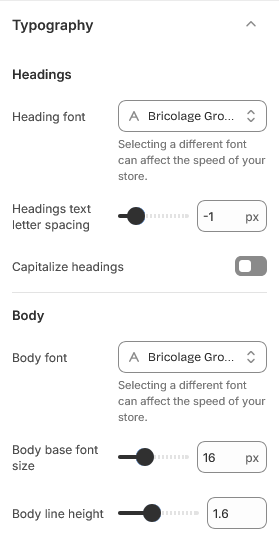
Choosing fonts
Both pickers list Shopify's font library, which includes Google Fonts and a set of licensed families. Fonts chosen here are served from Shopify's CDN, so there is nothing to upload and no third-party request to configure.
The theme loads the weights and styles it needs from whichever family you pick, including bold and italic, so text inside blog posts and product descriptions renders properly rather than being synthesised by the browser.
One family is usually enough
Setting the heading and body fonts to the same family — with the weight doing the work instead — is a safe default and loads less. Greenix ships this way. Reach for a second family only when the pairing genuinely earns it.
Letter spacing and capitalization
Headings text letter spacing is negative by default. Tightening headings slightly is what gives them their compact look; loosening it back to 0 gives a more traditional feel. Small changes go a long way here — a step of one or two is usually enough.
Capitalize headings switches every heading to uppercase. It affects presentation only, so your headings stay readable in the theme editor and in search results.
Body text
Body base font size sets the size the rest of the type scales from. Raising it enlarges body copy across the store, and the theme keeps its own proportions relative to it.
Body line height controls the space between lines. Longer lines need more of it. If your product descriptions run wide, 1.6 and above will read more comfortably than a tighter value.
Headings
| Setting | Type | Default | Notes |
|---|---|---|---|
| Heading font | Font | bricolage_grotesque_n4 | Selecting a different font can affect the speed of your store. |
| Headings text letter spacing | Slider (-12–50 px) | -1 | — |
| Capitalize headings | Checkbox | Off | — |
Body
| Setting | Type | Default | Notes |
|---|---|---|---|
| Body font | Font | bricolage_grotesque_n4 | Selecting a different font can affect the speed of your store. |
| Body base font size | Slider (12–24 px) | 16 | — |
| Body line height | Slider (1–2.5) | 1.6 | — |