
Appearance
Announcement bar
The strip above the header. It carries a short message — free shipping over a threshold, a sale, a shipping cut-off date — and optionally the social icons and the currency and language selectors.
Find it in the theme editor under Header → Announcement bar.

One message or several
With Enable slideshow off, the bar shows the single Text setting.
With it on, the bar rotates through Announcement slide blocks. Add a block per message, then set Autoplay delay for how long each stays and Transition speed for how quickly it changes.
Two or three messages, not six
Each message is only on screen for a few seconds, so a customer has to wait through the rotation to read them all — and most will not. If you have six things to say, the announcement bar is the wrong place for four of them.
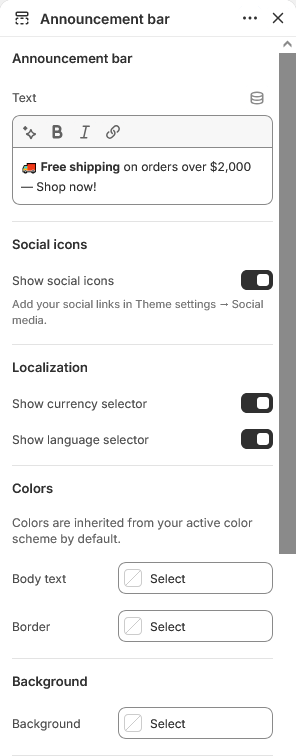
Localization selectors
Show currency selector and Show language selector put the customer's market controls in the bar.
Both only appear when the store actually offers a choice. If you sell in one currency, the currency selector stays hidden however this is set — Shopify provides nothing to select. Configure markets and languages under Settings → Markets in the admin.
Social icons
Show social icons displays the profile links you filled in under Social media. Networks left blank there do not appear.
Appearance
Body text, Border and Background override the color scheme for this bar alone. Leave them blank to follow the scheme.
The announcement bar is a natural place to break from the scheme deliberately — a contrasting strip draws the eye, which is the point of it.
Padding top and Padding bottom set its height. Keep it modest: this bar sits above the header, so every pixel here pushes your hero further down the first screen.
Section settings
Announcement bar
| Setting | Type | Default | Notes |
|---|---|---|---|
| Text | Rich text | Welcome to our store | — |
Social icons
| Setting | Type | Default | Notes |
|---|---|---|---|
| Show social icons | Checkbox | On | Add your social links in Theme settings → Social media. |
Localization
| Setting | Type | Default | Notes |
|---|---|---|---|
| Show currency selector | Checkbox | On | — |
| Show language selector | Checkbox | On | — |
Colors
Colors are inherited from your active color scheme by default.
| Setting | Type | Default | Notes |
|---|---|---|---|
| Body text | Color | — | — |
| Border | Color | — | — |
Background
| Setting | Type | Default | Notes |
|---|---|---|---|
| Background | Color | — | — |
Padding
| Setting | Type | Default | Notes |
|---|---|---|---|
| Padding top | Number | 12 | Adjust the top padding for this section. If left empty, the global section padding will be used by default. |
| Padding bottom | Number | 12 | Adjust the bottom padding for this section. If left empty, the global section padding will be used by default. |
Slideshow
| Setting | Type | Default | Notes |
|---|---|---|---|
| Enable slideshow | Checkbox | On | Add announcement blocks below to use the slideshow. |
| Autoplay delay | Slider (1000–8000 ms) | 3000 | — |
| Transition speed | Slider (200–1000 ms) | 500 | — |
Blocks
Announcement slide
| Setting | Type | Default | Notes |
|---|---|---|---|
| Slide text | Rich text | Free shipping on orders over $50. Shop now! | — |