
Appearance
Blog showcase
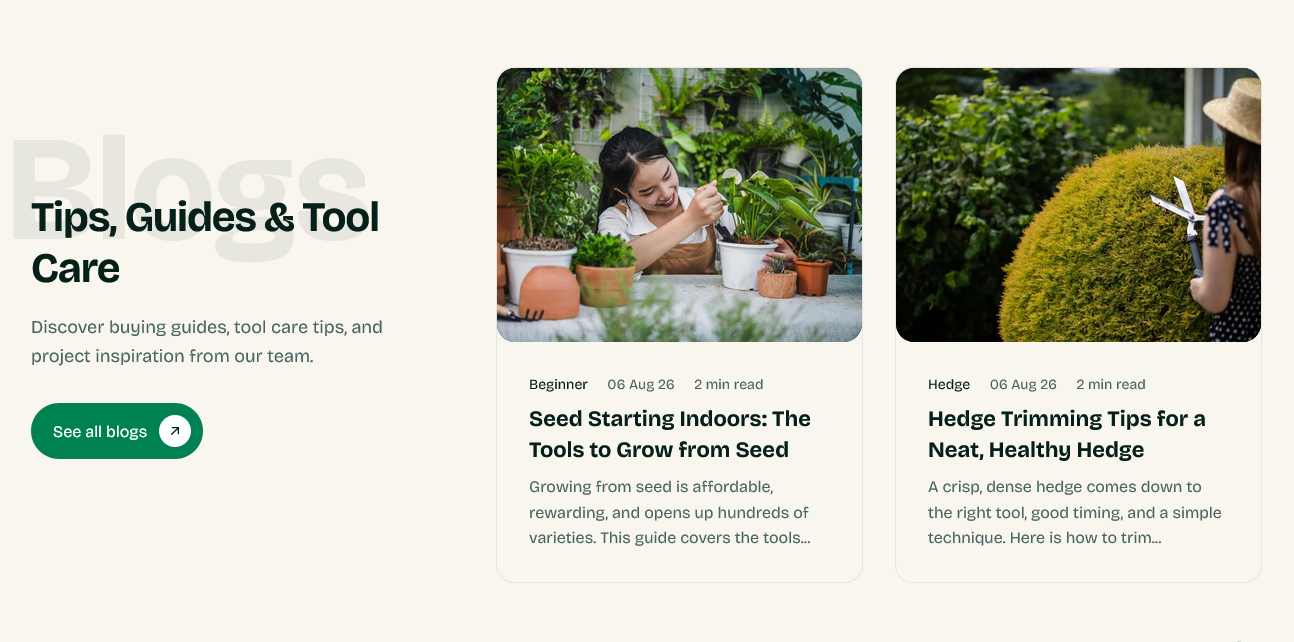
Recent posts from one of your blogs, shown on the home page or anywhere else.
Setting it up
Blog chooses which blog to draw from — useful when you run more than one. Posts to show caps how many appear, and they come in newest first.
Heading, Description, Button label and Button link cover the text above. Point the button at the blog itself.
Watermark text is the large decorative word behind the section.
Show estimated read time adds a reading time to each card, calculated from the post's length.
How the cards look
Each post uses the shared article card, so the image shape and whether the date, author and tag appear are set once and match the blog listing.
Whether it earns its place
A blog section on the home page pays off when the writing does a job — care guides, comparisons, how-tos that answer what customers ask before buying.
It costs you when the blog is stale. Three posts from two years ago, dated on every card, tell a visitor the store is not looked after. If you are not going to publish regularly, leave this section off and put the effort into the pages that sell.
Settings
Section settings
Content
| Setting | Type | Default | Notes |
|---|---|---|---|
| Watermark text | Text | Blogs | — |
| Heading | Text | Tips, Guides & Tool Care | — |
| Heading tag | Dropdown | H2 | Options: H1, H2, H3 |
| Description | Multi-line text | Discover buying guides, tool care tips, and project inspi… | — |
| Button label | Text | See all blogs | — |
| Button link | Link | — | Defaults to the selected blog when left empty. |
Blog
| Setting | Type | Default | Notes |
|---|---|---|---|
| Blog | Blog | — | — |
| Posts to show | Slider (1–3) | 2 | — |
| Show estimated read time | Checkbox | On | — |
Background
| Setting | Type | Default | Notes |
|---|---|---|---|
| Background | Color | — | — |
Padding
| Setting | Type | Default | Notes |
|---|---|---|---|
| Padding top | Number | 70 | Adjust the top padding for this section. If left empty, the global section padding will be used by default. |
| Padding bottom | Number | 70 | Adjust the bottom padding for this section. If left empty, the global section padding will be used by default. |