
Appearance
Countdown sale
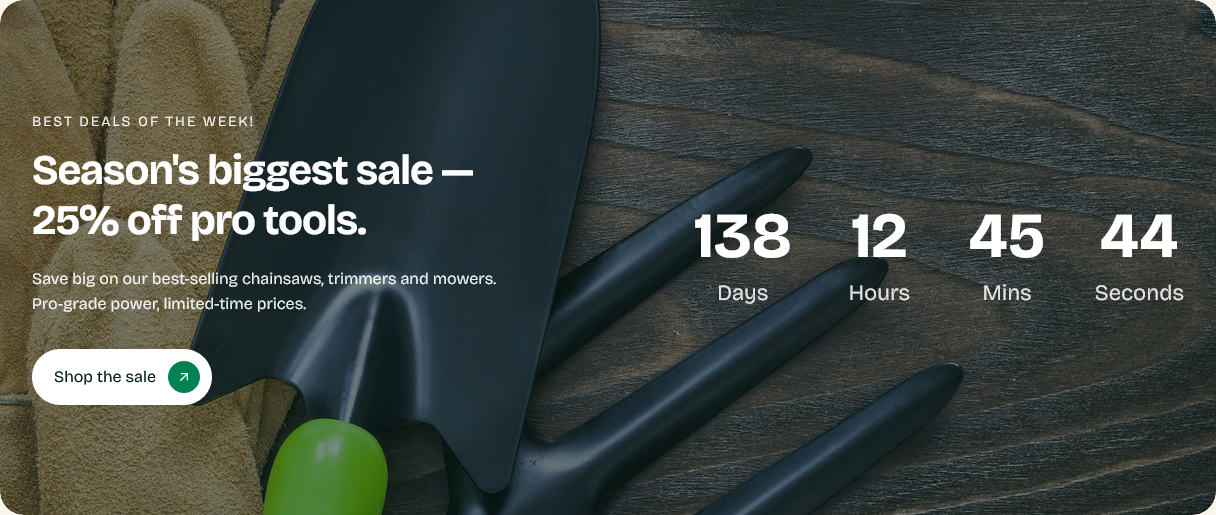
A banner with a live countdown to a deadline, over a background image.
Setting it up
End date and End time set the deadline. The countdown runs down to it and then shows the Expired message.
The time you enter is read in the visitor's timezone
The date and time are not fixed to your store's timezone. They are read as wall-clock time wherever the visitor happens to be.
Set the end to 23:59 and a customer in London sees it end at 23:59 London time, while one in Dhaka sees it end at 23:59 Dhaka time — six hours apart in real terms.
For a promotion that reads as "ends at midnight, wherever you are", that is exactly right and needs no thought. For a deadline tied to something you actually do — a dispatch cut-off, a stock release — it will mislead international customers, and the wording should say which timezone you mean.
Label, Heading, Description, Button label and Button link cover the text.
The expired message
Set it. A countdown that reaches zero and keeps showing the old offer is worse than never having run one — it tells visitors your store is not maintained.
Better still, put a reminder in your calendar to remove or update the section when the sale ends. The expired message is a safety net, not a plan.
Background
Background image sits behind the content, with Overlay opacity darkening it so the text stays readable.
Enable parallax effect makes the image drift as the page scrolls.
Using it honestly
A countdown works because it is true. A deadline that resets every week teaches returning customers to ignore it, and takes the rest of your store's claims with it.
Use it for genuine deadlines — a sale that really ends, a shipping cut-off before a holiday, a limited run.
Settings
Section settings
Content
| Setting | Type | Default | Notes |
|---|---|---|---|
| Label | Text | Best deals of the week! | — |
| Heading | Text | Season's biggest sale — 25% off pro tools. | — |
| Description | Multi-line text | Save big on our best-selling chainsaws, trimmers and mowe… | — |
| Button label | Text | Shop the sale | — |
| Button link | Link | — | — |
Countdown
| Setting | Type | Default | Notes |
|---|---|---|---|
| End date | Text | 2026-12-31 | Format: YYYY-MM-DD |
| End time | Text | 23:59:59 | Format: HH:MM:SS (store timezone) |
| Expired message | Text | This sale has ended. | — |
Background
| Setting | Type | Default | Notes |
|---|---|---|---|
| Background image | Image | — | — |
| Overlay opacity | Slider (0–90 %) | 60 | — |
Parallax animation
| Setting | Type | Default | Notes |
|---|---|---|---|
| Enable parallax effect | Checkbox | On | Enable parallax animation for the background image |
Padding
| Setting | Type | Default | Notes |
|---|---|---|---|
| Padding top | Number | — | Adjust the top padding for this section. If left empty, the global section padding will be used by default. |
| Padding bottom | Number | — | Adjust the bottom padding for this section. If left empty, the global section padding will be used by default. |