
Appearance
FAQ
Questions grouped into categories, each expanding to reveal its answer, with an optional search box.
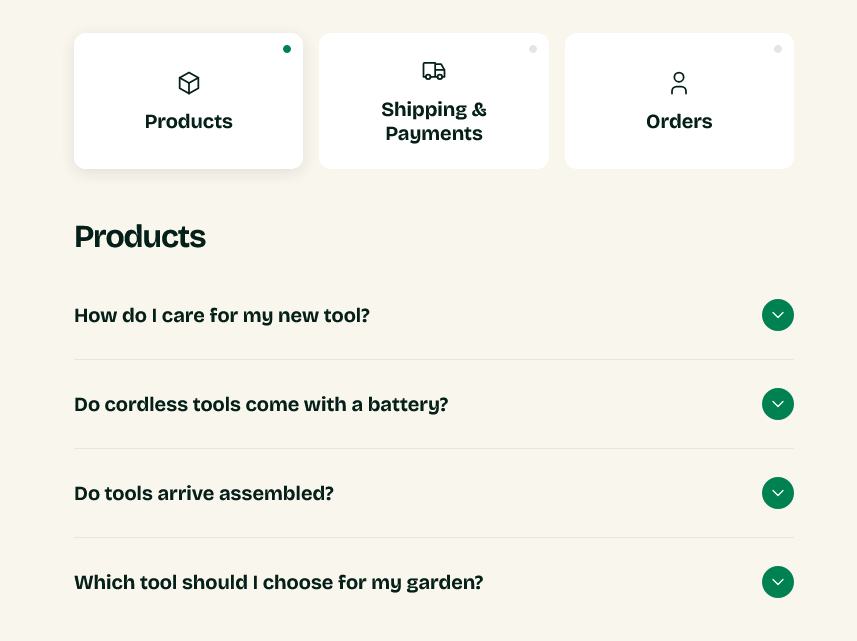
Setting it up
Add a Category block per group, then an FAQ item block inside each for every question.
Group heading names a category. Each item takes a Label — the question — and its answer.
Show search box adds a filter above the list, with Search placeholder setting its text. Worth turning on once you have more than a dozen questions; below that, scanning is faster than typing.
Choosing the questions
Take them from your inbox, not your imagination. The questions worth answering here are the ones people actually send you, and you already have a record of them.
Group them by when a customer asks: before ordering, about delivery, after arrival. That matches how someone arrives at the page — with a specific worry — better than grouping by your internal departments.
Writing the answers
Answer in the first line. Someone expanding a question wants the answer, not a preamble — "Yes, within 30 days" then the conditions, rather than the conditions building to a yes.
Keep each short. If an answer needs several paragraphs, put a summary here and link to a full page.
The dedicated FAQ template
Greenix ships a page.faq template built around this section. Create a page under Content → Pages and set its Theme template to faq.
That template ignores page content
The FAQ template is built entirely from this section's blocks, so anything typed into the page's content editor will not appear. Put the questions into the section, not the page.
Settings
Section settings
Content
| Setting | Type | Default | Notes |
|---|---|---|---|
| Heading | Text | Support & FAQs | — |
| Heading tag | Dropdown | H2 | Options: H1, H2, H3. Use H1 only when this section carries the page title and there is no page hero above it. |
| Description | Multi-line text | Need help? Browse the questions below, or get in touch an… | — |
| Group heading | Text | — | Only used when the section has no category blocks. With categories, each card's label becomes its heading. |
Search
| Setting | Type | Default | Notes |
|---|---|---|---|
| Show search box | Checkbox | On | Filters questions as the shopper types. Requires JavaScript. |
| Search placeholder | Text | Search... | — |
Background
| Setting | Type | Default | Notes |
|---|---|---|---|
| Background | Color | — | — |
Padding
| Setting | Type | Default | Notes |
|---|---|---|---|
| Padding top | Number | — | Adjust the top padding for this section. If left empty, the global section padding will be used by default. |
| Padding bottom | Number | — | Adjust the bottom padding for this section. If left empty, the global section padding will be used by default. |
Blocks
Category
Every FAQ item added below this block belongs to this category, until the next category block.
| Setting | Type | Default | Notes |
|---|---|---|---|
| Label | Text | Products | — |
| Icon | Dropdown | Package | Options: Package, Truck, Account, Leaf, Credit card, Question mark, Gift, Support headset, Returns, None |
| Custom icon | Image | — | Overrides the icon above. 56 x 56px recommended |
FAQ item
| Setting | Type | Default | Notes |
|---|---|---|---|
| Question | Text | How do I place an order? | — |
| Answer | Rich text | <p>Add your answer here. Keep it short and specific — mos… | — |