
Appearance
Newsletter popup
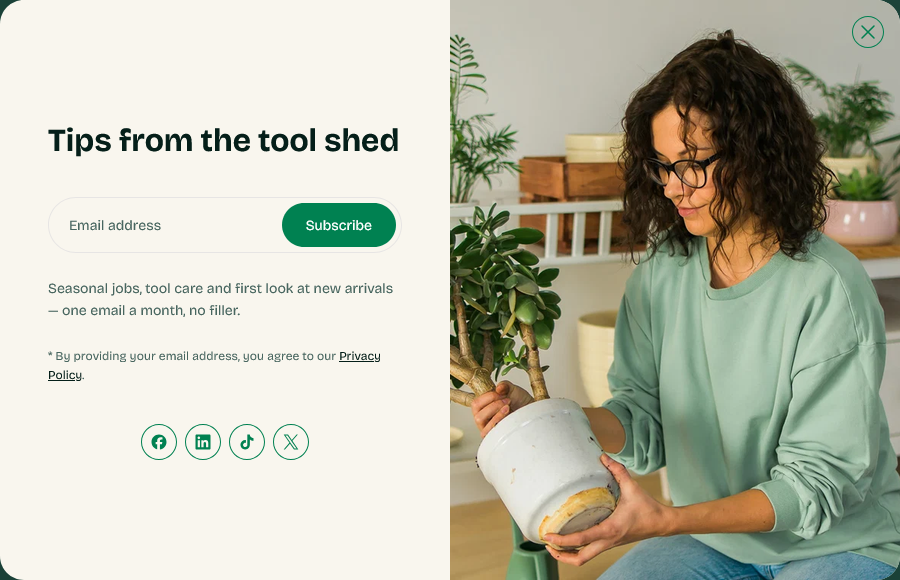
A modal that opens after a delay and asks for an email address. It appears on the home page only, and once a visitor has seen it, it stays away for seven days.
Find it in the theme editor under Overlay group → Newsletter popup.
How often it shows
Once per visitor per week. Closing the popup — or subscribing — sets a cookie that suppresses it for seven days, so a returning customer is not asked again on their next visit.
It also only appears on the home page. Someone who lands on a product page from search is not interrupted before they have seen what you sell.
Testing it
Because of the cookie, the popup will not reappear for you after you close it once. Open the store in a private window to see it again.
Timing
Show after (seconds) sets the delay. The default is 10.
Shorter is not better. A popup that opens before the visitor has read anything gets dismissed reflexively, and that dismissal costs you the next seven days. Long enough to have scrolled past the hero is a reasonable target.
Content
| Setting | Notes |
|---|---|
| Left image | The image beside the form |
| Heading | Keep it short — it is read in a glance |
| Paragraph | Say what they are signing up to receive |
| Email input placeholder | Usually fine as Email address |
| Subscribe button text | |
| Disclaimer text | Rich text, so it can hold a link to your privacy policy |
The Paragraph is where the popup is won or lost. "Subscribe to our newsletter" asks for something and offers nothing. Saying what arrives, and how often, gives a reason to type an address.
Where the addresses go
Subscribers are added to your Shopify customer list with email marketing consent. Find them under Customers in the admin, filtered by email subscription status.
Nothing is sent automatically. Connect Shopify Email or another marketing app to actually send to the list.
Turning it off
Enable popup switches it off entirely without removing the section, so your content stays in place for when you want it back.
Section settings
General
| Setting | Type | Default | Notes |
|---|---|---|---|
| Enable popup | Checkbox | On | — |
| Show after (seconds) | Slider (1–60 s) | 10 | — |
Content
| Setting | Type | Default | Notes |
|---|---|---|---|
| Left image | Image | — | — |
| Heading | Text | Tips from the tool shed | — |
| Paragraph | Text | Seasonal jobs, tool care and first look at new arrivals —… | — |
| Email input placeholder | Text | Email address | — |
| Subscribe button text | Text | Subscribe | — |
| Disclaimer text | Rich text | <p>* By providing your email address, you agree to our <a… | — |