
Appearance
Pagination
How many items appear on a page before the customer has to load more, and how that control looks. It applies to collection pages, search results, the collections list and the blog.
Open Theme settings → Pagination in the theme editor.
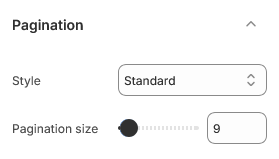
Pagination size
The number of items per page.
This is the setting with real consequences. Every product on the page loads its own image, so a high number makes the first page slower — noticeably so on a phone. A low number makes customers click more often to see your catalog.
Some guidance:
| Catalog | Reasonable range |
|---|---|
| Small, considered range | 8–12 |
| Typical store | 12–24 |
| Large catalog with filters | 24–36 |
Greenix ships at 9, which suits a three-column grid on desktop and keeps the first page light.
If you sell a large catalog, raising this is not the answer — good filters are. Customers narrow down rather than scroll through everything.
Individual sections can override this
Collection and search sections have their own products-per-page setting. This theme setting is the default they fall back to.
Style
Style sets how the control looks at the bottom of the list.
Whichever you choose, the theme paginates rather than loading everything at once. That keeps each page fast and gives search engines a real URL for every page of a collection, which infinite scrolling does not.
| Setting | Type | Default | Notes |
|---|---|---|---|
| Style | Dropdown | Standard | Options: Standard, Show more, Infinite scroll |
| Pagination size | Slider (8–48) | 9 | This is the global pagination. Sections with their own per-page setting, such as collection, blog, or search, keep that setting instead. |