
Appearance
Cart drawer
The cart that slides in from the side instead of taking the customer to a separate page. Adding an item opens it, showing what was added and what the order now totals, without losing the page they were on.
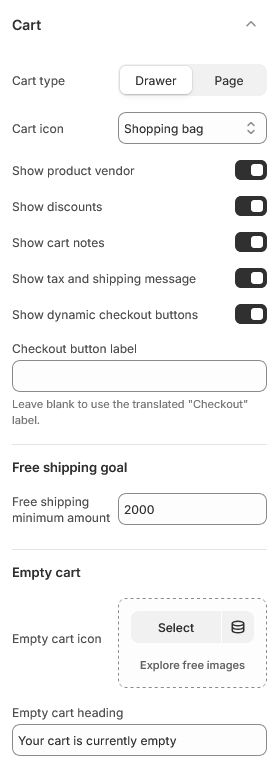
It has no settings of its own. Everything it shows is configured under Theme settings → Cart.
Turning it on
Set Cart type to Drawer in theme settings. Set it to Page instead and the drawer never opens — the cart icon links to the cart page.
Both are complete. This is a real choice about how you want customers to shop, not a shortcut versus a proper version.
What it shows
Driven entirely by theme settings:
- Line items with image, title, options and price
- Product vendor, if enabled
- Discounts applied to each line, if enabled
- A cart note field, if enabled
- Free shipping progress, if you set a threshold
- Tax and shipping message, if enabled
- Checkout button, plus accelerated checkout buttons if enabled
Changing the quantity refreshes the whole drawer rather than just that line, so cart-level discounts and the free shipping message stay correct.
Why it has no settings
Everything in the drawer also exists on the cart page, and a customer should not meet two different carts in one store. Keeping the settings in one place means switching between drawer and page changes where the cart appears, not what it contains.
This section has no settings of its own. Its appearance is controlled by the theme settings it reads.