
Appearance
Article cards
The tile that represents a blog post — on the blog listing, in Blog showcase, and in Related posts.
Open Theme settings → Article cards in the theme editor.
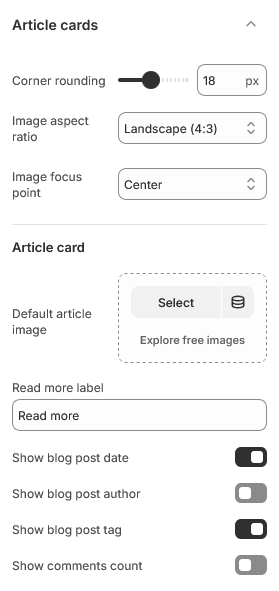
Images
Image aspect ratio and Image focus point work as they do on the other card types: the ratio keeps a row of posts aligned, and the focus point decides what survives the crop when a focal point has not been set on the image itself.
Default article image is the fallback for posts with no featured image. Blog posts are often published without one, and without a fallback those cards come out blank, so this is worth setting even if you intend every post to have its own image.
What the card shows
| Setting | Notes |
|---|---|
| Show blog post date | The published date, not the created date |
| Show blog post author | Off by default — useful for multi-author blogs |
| Show blog post tag | The first tag on the post |
| Show comments count | Only meaningful if comments are enabled on the blog |
Comments are enabled per blog under Content → Blog posts → Manage blogs in the admin. If they are off, turning this setting on shows nothing.
Read more label is the wording on the link. Keep it short — it sits under the excerpt, where a long label competes with the post title.
Excerpts
Cards show the post's excerpt. If a post has none, the theme falls back to the beginning of its content, so a card is never empty.
Writing a real excerpt is worth the minute it takes — the automatic fallback starts at whatever the first sentence happens to be, which is often a sub-heading or a lead-in that reads oddly out of context. Set one under Content → Blog posts → Excerpt.
| Setting | Type | Default | Notes |
|---|---|---|---|
| Corner rounding | Slider (0–40 px) | 18 | — |
| Image aspect ratio | Dropdown | Landscape (4:3) | Options: Adapt to image, Square (1:1), Portrait (3:4), Landscape (4:3) |
| Image focus point | Dropdown | Center | Options: Center, Top, Bottom |
Article card
| Setting | Type | Default | Notes |
|---|---|---|---|
| Default article image | Image | — | — |
| Read more label | Text | Read more | — |
| Show blog post date | Checkbox | On | — |
| Show blog post author | Checkbox | Off | — |
| Show blog post tag | Checkbox | On | — |
| Show comments count | Checkbox | Off | — |