
Appearance
Social media
Two separate things share this group: the share buttons that appear on product pages and blog posts, and the profile links that appear in the footer. They are configured independently.
Open Theme settings → Social media in the theme editor.
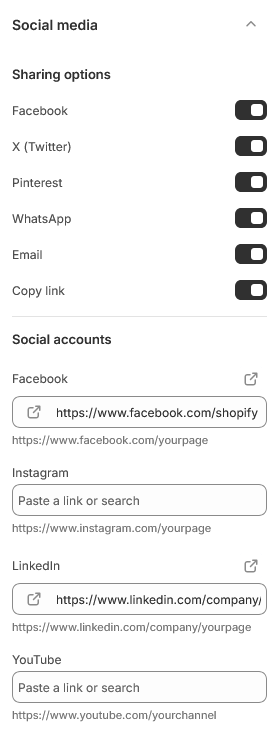
Sharing
The first set of switches controls which share options a customer sees on a product page or blog post.
Alongside the networks there are two that are not social at all and are worth keeping on:
- Email — how people send a product to a partner before buying.
- Copy link — the one that actually gets used, because it works with whatever the customer wanted to paste it into.
Sharing does not need a profile link. You can offer sharing to Pinterest without having a Pinterest account.
Profile links
The second set is a URL field per network. Fill one in and its icon appears in the footer; leave it empty and nothing shows.
Enter the full address, including https://.
Only link accounts you keep up
An icon leading to a page whose last post is two years old is worse than no icon. Link the two or three accounts you genuinely maintain and leave the rest blank.
WhatsApp
WhatsApp appears in both sets, and they do different jobs.
As a share option it opens WhatsApp with a link to the page. As a profile link it should be a https://wa.me/ address with your number in international format and no spaces, dashes or leading zeros — for example https://wa.me/8801712345678.
Sharing options
| Setting | Type | Default | Notes |
|---|---|---|---|
| Checkbox | On | — | |
| X (Twitter) | Checkbox | Off | — |
| Checkbox | On | — | |
| Checkbox | On | — | |
| Checkbox | On | — | |
| Copy link | Checkbox | On | — |
Social accounts
| Setting | Type | Default | Notes |
|---|---|---|---|
| Link | — | https://www.facebook.com/yourpage | |
| Link | — | https://www.instagram.com/yourpage | |
| Link | — | https://www.linkedin.com/company/yourpage | |
| YouTube | Link | — | https://www.youtube.com/yourchannel |
| TikTok | Link | — | https://www.tiktok.com/@yourusername |
| X (Twitter) | Link | — | https://x.com/yourusername |
| Link | — | https://www.pinterest.com/yourusername | |
| Snapchat | Link | — | https://www.snapchat.com/add/yourusername |
| Tumblr | Link | — | https://www.tumblr.com/yourusername |
| Vimeo | Link | — | https://vimeo.com/yourusername |
| Link | — | https://wa.me/1234567890 | |
| Threads | Link | — | https://www.threads.net/@yourusername |