
Appearance
Values band
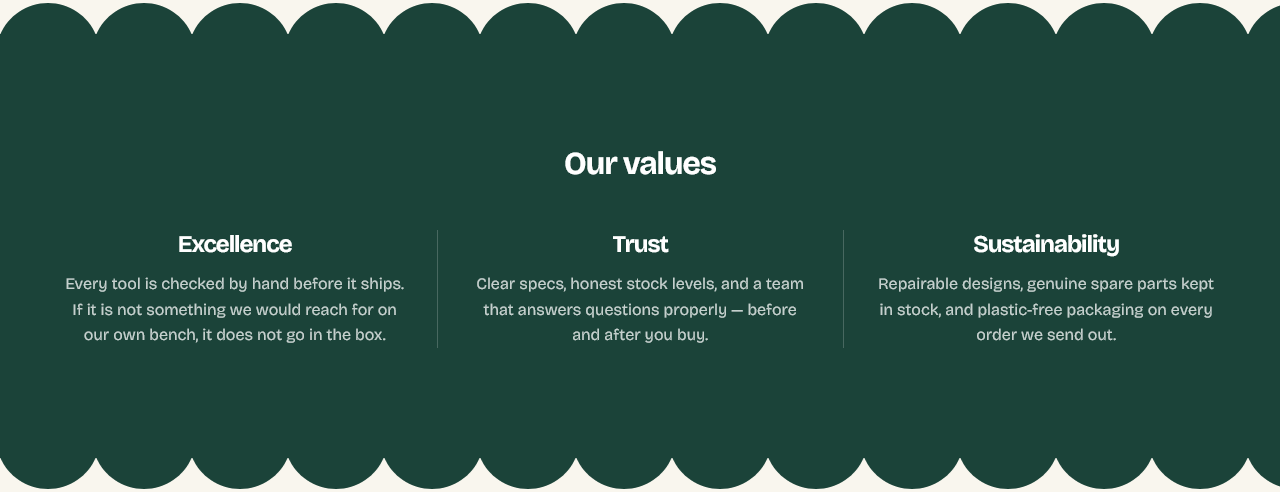
A slim row of short promises — free shipping, guarantees, returns. The band that reassures without taking up a screen.
Setting it up
Heading is optional. Add a Value block per promise, each holding a single line of Text.
Keep each to a few words. This section is scanned, not read — anything that needs a sentence belongs in Feature callout, which gives it room.
Three or four values. On a phone they stack, so a long list turns a slim band into a tall one.
Scalloped edges
Show scalloped edges gives the band a wavy top and bottom rather than straight ones, and Bump size sets how pronounced the waves are.
It is a decorative choice, and it reads best when the band's background contrasts with the sections around it — the scallop is only visible where two colors meet.
Where to put it
Directly under the Hero, or just above the footer.
Under the hero it answers the questions a new visitor has before they start browsing. Above the footer it catches them once more before they leave.
Both at once is one too many.
Settings
Section settings
Content
| Setting | Type | Default | Notes |
|---|---|---|---|
| Heading | Text | Our values | — |
Scalloped edges
| Setting | Type | Default | Notes |
|---|---|---|---|
| Show scalloped edges | Checkbox | On | Adds the row of rounded bumps used by the Trusted brands section. Bumps take the band's background color. |
| Bump size | Slider (12–60 px) | 32 | — |
Background
| Setting | Type | Default | Notes |
|---|---|---|---|
| Background | Color | — | — |
Padding
| Setting | Type | Default | Notes |
|---|---|---|---|
| Padding top | Number | — | Adjust the top padding for this section. If left empty, the global section padding will be used by default. |
| Padding bottom | Number | — | Adjust the bottom padding for this section. If left empty, the global section padding will be used by default. |
Blocks
Value
| Setting | Type | Default | Notes |
|---|---|---|---|
| Heading | Text | Excellence | — |
| Text | Rich text | <p>Describe what this value means for your customers.</p> | — |