
Appearance
Complementary products
Products that go with the one being viewed — the chain for the chainsaw, the gloves for the pruner. Unlike You may also like, these are pairings you choose.
This section can only be added to a product template.
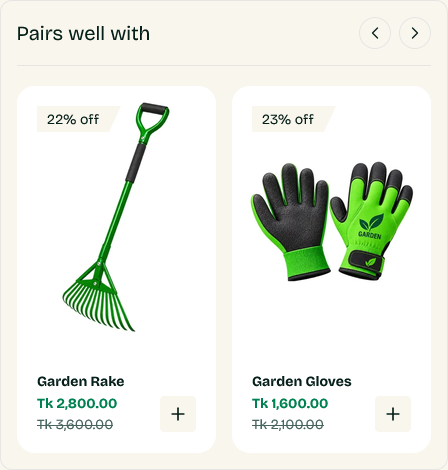
You have to set the pairings first
The section shows nothing until you tell Shopify which products complement which. That is done in the free Search & Discovery app, not in the theme:
- Install Search & Discovery from the Shopify App Store.
- Open it and go to Product recommendations.
- Pick a product, then add its complementary products.
Repeat for each product you want pairings on. The section hides itself on products where none are set, so there is no harm in adding it before you have finished.
Start with your best sellers
Setting pairings for a whole catalog is a long job. The first twenty products by sales volume will cover most of the traffic this section ever sees.
Settings
Products count caps how many appear. Products per view sets how many are visible at once, with the rest reachable by scrolling sideways.
Two or three well-chosen pairings beat ten loose ones. The point is a genuine "you will also need this", not a second recommendation carousel.
Where to put it
Either as a block inside the product page section, near add to cart, or as this standalone section further down.
Near add to cart is the stronger position — it catches the customer while they are deciding, not after they have scrolled past.
Settings reference
Where it can be used
This section can only be added to the product template.
Section settings
Background
| Setting | Type | Default | Notes |
|---|---|---|---|
| Background | Color | — | — |
Padding
| Setting | Type | Default | Notes |
|---|---|---|---|
| Padding top | Number | 0 | Adjust the top padding for this section. If left empty, the global section padding will be used by default. |
| Padding bottom | Number | 60 | Adjust the bottom padding for this section. If left empty, the global section padding will be used by default. |
| Heading | Text | Pairs Well With | — |
| Products count | Slider (1–10) | 10 | — |
| Products per view | Slider (2–5) | 4 | — |